
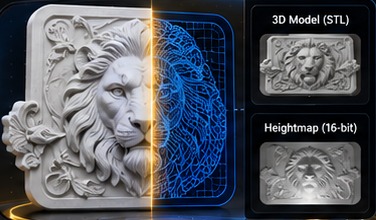
Turn Any Photo Into a CNC 3D Relief
Create detailed heightmaps and 3D relief models for professional carving — powered by AI.
For best results: clean up your photo with AI first
Open ChatGPT or Gemini, attach your photo, paste this prompt and send. Then upload the new photo here. Before uploading, check that text, calligraphy and faces were not changed.
Conversion
STL & Heightmaps
Fine Details
Stone, Metal & More
Made With Naqshu
Real reliefs from our AI. Tap a picture to see it large.
From Photo to CNC-Ready 3D Relief
Turn your images into detailed 3D reliefs in just a few steps.
Upload
Any photo — even a phone picture of a door, headboard or carved panel.
Crop & straighten
Crop a plain rectangle, or drag four corners to straighten a photo taken at an angle. Or skip it.
Set the size
Enter the width in mm. Depth is set for each design automatically, or type your own.
Download & carve
Get an STL or 16-bit heightmap — ready for Aspire, ArtCAM and more.
A Relief Ready for Your Machine
Carving-ready files
Fine detail, solid edges and files that open directly in your CAM software.
Depth for every design
Each design gets its own depth for its size. Prefer your own? Switch to Manual and type it.
Adjust before you download
Change the maximum depth, reverse the relief or add a base, and see it live in 3D.
 Need a CNC machine to carve it? LifeCam CNC, Lahore: routers, 4-axis, laser and plasma machines.
See machines →
Photo to 3D Relief: Questions
Naqshu is an AI relief generator for CNC. It turns a photo or picture into a 3D bas relief, as an STL file and a 16-bit heightmap, for wood carving, stone and sign work.
How do I turn a photo into a 3D relief STL?
Upload your photo, crop it and enter the width in mm. The AI makes the relief, usually within a few minutes. In the 3D preview you can change the depth, reverse it or add a base, then download the STL and the 16-bit PNG heightmap.
Which CNC software opens the files?
The STL and the greyscale heightmap open in Vectric Aspire, ArtCAM, Carveco, Fusion 360 and other CAD/CAM software that imports STL models or heightmap images. See the step-by-step guide for each program. Aspire users can also make the relief inside Aspire with our free Aspire gadget.
What kind of photo gives the best relief?
A sharp photo taken straight on, in even light, with the design filling the frame. Dark, shiny or shadowed photos give less detail. Small photos (under 1500 px, like most WhatsApp pictures) are enlarged automatically. For the cleanest result, first tidy the photo with the free AI prompt under the upload box.
Can it make Arabic and Islamic calligraphy reliefs?
Yes. Calligraphy panels, ornaments, flowers, animals, portraits and carved doors all work. For lettering, check every letter in the 3D preview before you carve.
Is it free?
Every new account gets 2 free reliefs. After that, reliefs come in packs: see Services and Pricing.
What happens to my photo?
We use it only to make your relief. It is not used to train our AI, and your photo and results are deleted automatically 7 days after the relief is made. See the Privacy Policy.
How big and how deep can the relief be?
You choose the width in mm for your panel. The depth is set for each design automatically, or you can switch to Manual and type your own.